Balance and top-up (escrow)
Business escrow balance in MeerPartners: available, reserved (hold), total topped up and charged. Why accruals are paused at zero and how to top up the deposit.
The Balance (escrow) page (/m/balance) is the money center of the business cabinet. It shows how much is free, how much is reserved against conversions, and how much you have already spent. This is also where the deposit is topped up. Only the Owner role (merchant_owner) can manage the balance and top up the deposit.
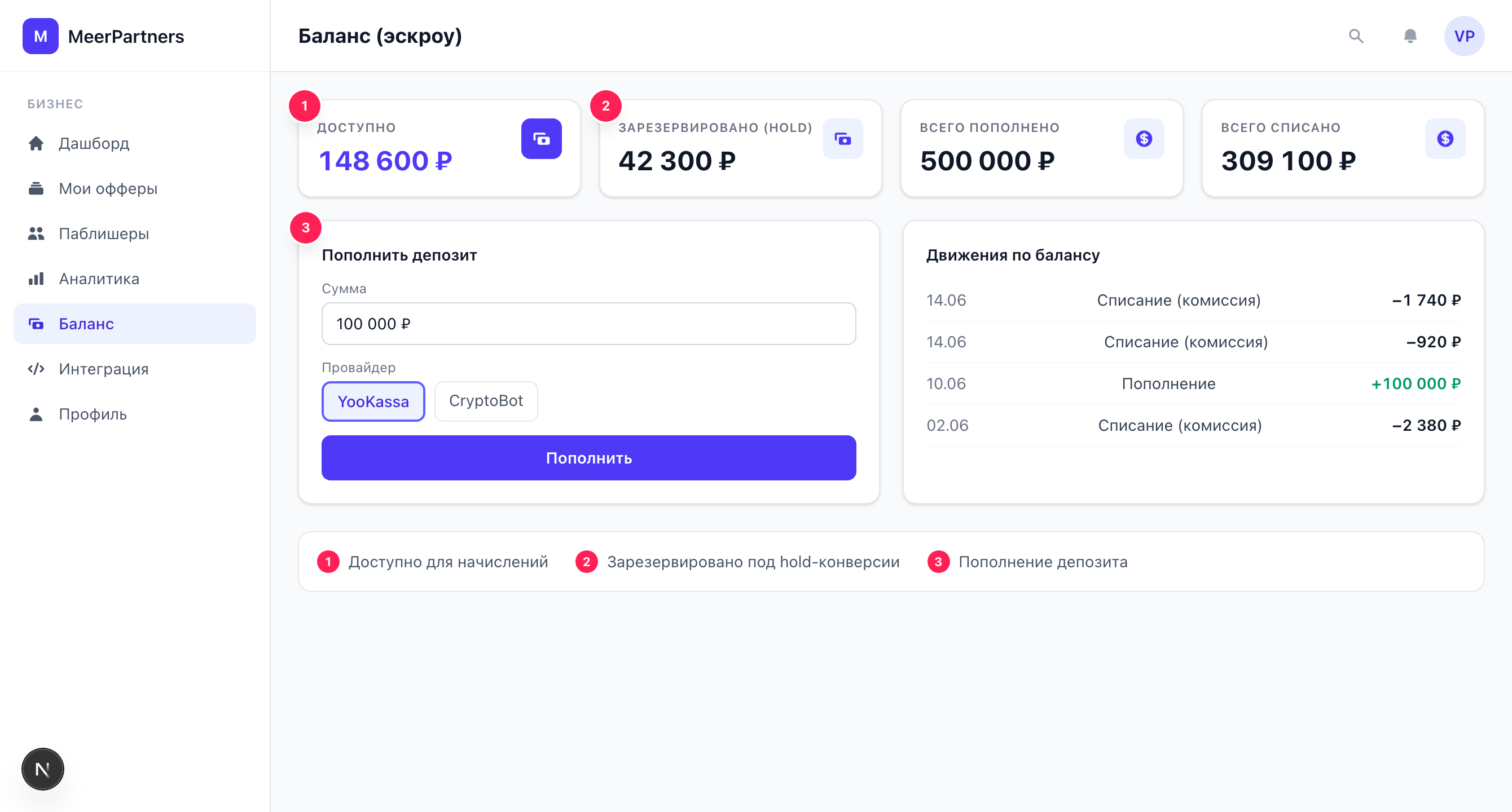
Escrow model: four indicators
MeerPartners works on the escrow model: your money is reserved against accruals to partners before payout. This guarantees the influencer that a confirmed conversion will be paid, and guarantees you that you pay for results only.
| Indicator | What it means |
|---|---|
| Available | Free funds that new accruals are paid from. |
| Reserved (hold) | Money against conversions still in the hold period — frozen but not charged. |
| Total topped up | The sum of all successful deposits over all time. |
| Total charged | The sum of all rewards paid out over all time. |
How the money moves
A top-up increases Available and Total topped up. A new conversion reserves the commission: the amount moves from Available to Reserved. After hold passes, the commission is confirmed and moves to Total charged (or returns to Available if the conversion is rejected/refunded).
Deposit ──> [Available] ──conversion──> [Reserved (hold)]
                ▲                              │
   refund/rejection ─────────────────┤  hold expired
                                            ▼
                                      [Total charged]
Why accruals are "paused" at zero
If Available drops to zero (or below the threshold), the platform sets the pause flag and shows the banner:
Low balance — accruals to influencers are paused. Top up the deposit to continue.
What this means in practice
At a zero balance, new conversions do not turn into rewards — there is nothing to reserve. Publishers effectively work without pay, and traffic to your offers quickly dries up. The same banner is mirrored on the Dashboard. There is one solution — top up the deposit; after it is credited, accruals resume. Keep an "Available" reserve to avoid downtime.
Topping up the deposit
The "Top up deposit" button opens a form:
AmountnumberrequiredHow much to deposit. Must be greater than zero and not less than the minimum top-up amount, otherwise the error "Minimum top-up amount" appears.
Currencycurrency codeoptionalThe deposit currency (for example, RUB). A three-letter ISO code.
Payment methodprovideroptionalThe payment provider: card (YooKassa) or crypto (CryptoBot, USDT). If the chosen provider is unavailable, "Payment provider unavailable. Try another method." appears.
Open the top-up form
Click "Top up deposit".
Specify amount, currency and payment method
Choose a provider — card (YooKassa) or crypto (CryptoBot).
Proceed to payment
Click "Proceed to payment" — the platform redirects you to the provider's page.
Wait for crediting
After payment, the status is "Payment is processing. Crediting will happen after provider confirmation". The balance will be topped up once the provider confirms the payment.
The deposit isn't credited instantly
The payment is created in the "processing" status and is credited only after confirmation from the payment provider (webhook). This is a normal delay — don't top up again if the money is still "processing". If crediting hangs for a long time, check the payment status with the provider and contact support.
Ledger: balance movements
The "Balance movements" block is the history of all operations on the account:
| Column | What it shows |
|---|---|
| Type | The kind of operation (top-up, reserve, charge, refund, etc.). |
| Amount | The size of the operation. |
| Balance after | The remaining balance after the operation. |
| Reference | What the operation refers to (deposit, conversion, etc.). |
| Date | When the operation happened. |
If there have been no operations yet, "No movements yet" is shown. The ledger is the precise source of truth for the money: unlike "Spend" in analytics (accruals), here you see the real movement of funds.
Deposit auto top-up
The interface has an auto top-up settings block — the minimum balance threshold and the top-up amount.
Auto top-up — coming soon
Automatic top-up when the balance falls below the threshold will arrive later. For now, top up the deposit manually and watch the "Available" balance.