Tracking links and sub-id
How influencer tracking links work in MeerPartners: the /r/{code} code, sub_id tags for traffic analytics, clicks/conversions/EPC metrics, statuses and limits.
A tracking link is your personal URL for an offer. The platform records every click on it and attributes it to you, and credits a conversion from that click to your commission. The "My links" section (/i/links) is a list of all your links with metrics.
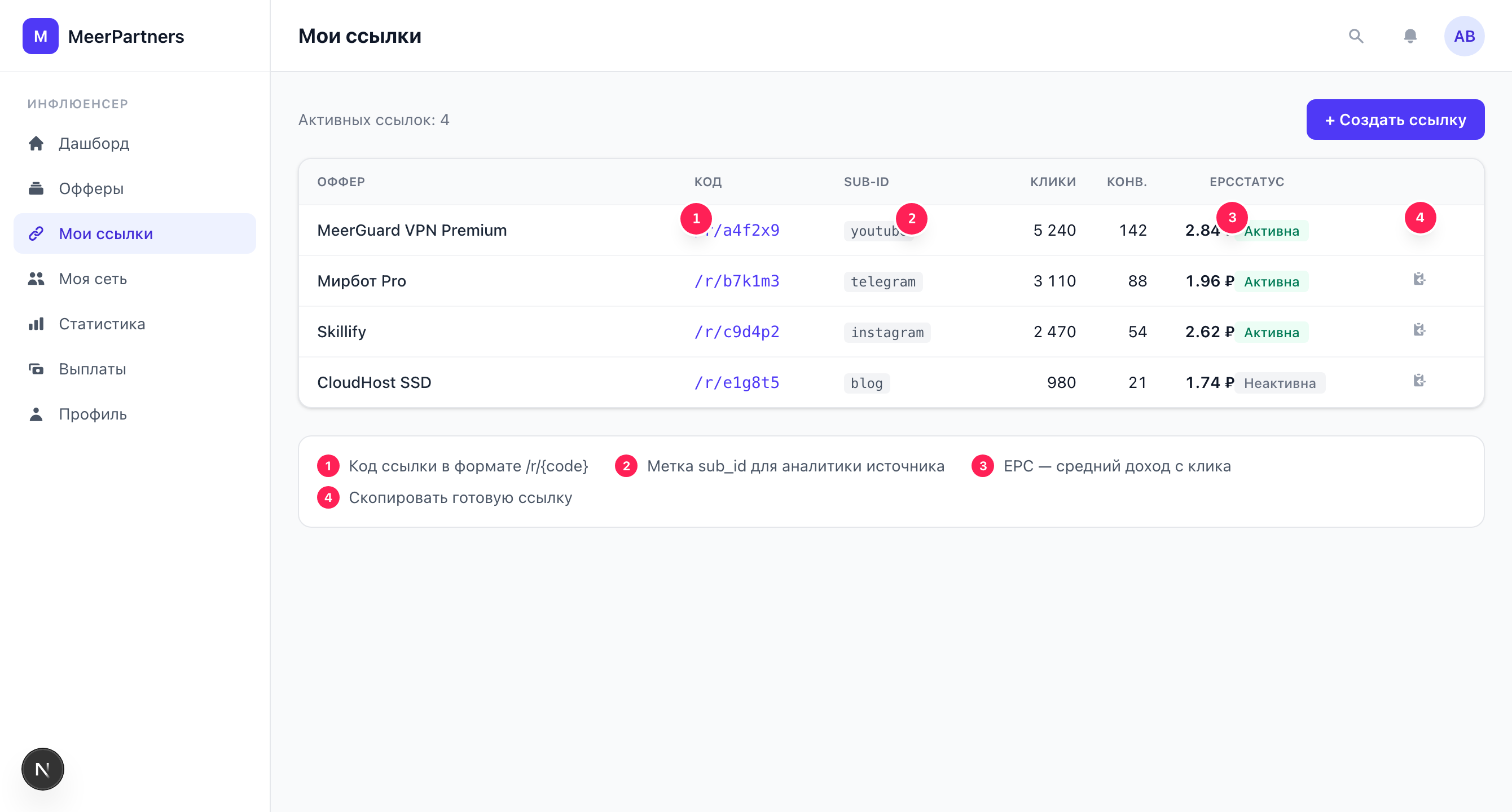
What the /r/{code} code is
Every link has a short code. The full address of the link looks like this:
https://<domain>/r/{code}/r/{code} is the "entry point" into tracking. When a user clicks it:
- The platform records the click and assigns it a
click_id. - It sets a signed attribution cookie (lifetime = the offer's attribution window).
- It does a redirect (302) to the business's landing page, passing
aff_click=<click_id>.
Later, when the user completes a target action, the conversion for that click_id comes back to you. The technical details of the redirect and macros are in the Tracking links and macros section.
How to create a link
Links are created from the offer catalog, not on the "My links" page itself.
Open the catalog
The "+ New link" button in the "My links" section leads to the offer catalog.
Choose an offer
Open the offer card and click "Get link".
Copy the link
The "Link code" and "Full URL" appear in the window. Click "Copy".
The created link immediately appears in the "My links" table.
sub_id tags — traffic analytics
sub_id is your own tags by which you distinguish traffic sources within a single link: channel, creative, campaign, placement. The platform saves them together with the click, and later you can see which source brought conversions.
The tags are passed as URL parameters on the click. The basic form:
https://<domain>/r/{code}?sub_id=telegramYou can use several tags at once — sub_id1…sub_id5:
https://<domain>/r/{code}?sub_id1=telegram&sub_id2=post42&sub_id3=banner-aHow to conveniently tag traffic
Set up a simple system: sub_id1 — platform (telegram, instagram, site), sub_id2 — a specific post/campaign, sub_id3 — creative. Then in statistics and in the "Sub-IDs" column you'll quickly see what actually works, and won't multiply unnecessary links.
sub_id in the links table
The "Sub-IDs" column in the "My links" section displays the tags specified when the link was created. Tags that you substitute directly into the URL on the click (as in the examples above) are attached to specific clicks and go into tracking — they're visible in detailed analytics, not as a property of the link itself.
Link metrics
Each table row shows the link's effectiveness:
| Column | What it means |
|---|---|
| Offer | The offer the link leads to. |
| Code | The short link code + a "Copy" button (copies the full /r/{code} URL). |
| Sub-IDs | The tags specified when the link was created. |
| Clicks | Total clicks and, below, the number of unique clicks. |
| Conv. | How many conversions the link brought. |
| EPC | Earnings Per Click — the average earnings from a single click. |
| Status | "Active" or "Inactive" (plus an "Offer paused" badge). |
EPC — the key payback indicator
EPC = commission ÷ clicks. This is the money each click brings on average. EPC is convenient to compare between links and offers: a high EPC means traffic pays off, even if there aren't many conversions. A low EPC with a large number of clicks is a signal that the traffic is untargeted or the offer doesn't fit.
Link statuses
- Active — the link works, clicks and conversions are credited.
- Inactive — the link is disabled, conversions on it are not accrued.
- Offer paused — the offer is temporarily paused by the business. Conversions don't come in until the offer is back in operation; new links for it cannot be created.
Common errors
| What you see | Cause and solution |
|---|---|
"Link limit reached for this offer" (LINK_LIMIT_REACHED) | The allowed number of links per offer is exceeded. Use sub_id tags in an already created link instead of creating new ones. |
"Offer paused" (OFFER_PAUSED) | A new link cannot be created: the offer is paused. Wait for it to resume or pick up a different offer. |
"Offer not found" (OFFER_NOT_FOUND) | The offer is unavailable or you don't have access to it (for example, a private offer without granted access). |
| "Error loading links" | The list failed to load. Refresh the page; if it recurs — try later. |
URL examples
https://<domain>/r/aB3xK9https://<domain>/r/aB3xK9?sub_id=telegramhttps://<domain>/r/aB3xK9?sub_id1=telegram&sub_id2=promo-jun&sub_id3=story