Offer moderation
Offer moderation in MeerPartners: In moderation, Active, Rejected and Paused statuses, what the platform checks, the rejection reason and how to resubmit an offer for review.
Every new offer and substantial edits go through platform moderation — this protects publishers and users from incorrect terms and broken landings. Until an offer is approved, publishers cannot see it or grab links. The offer status is visible in the Status column on the My offers page (/m/offers).
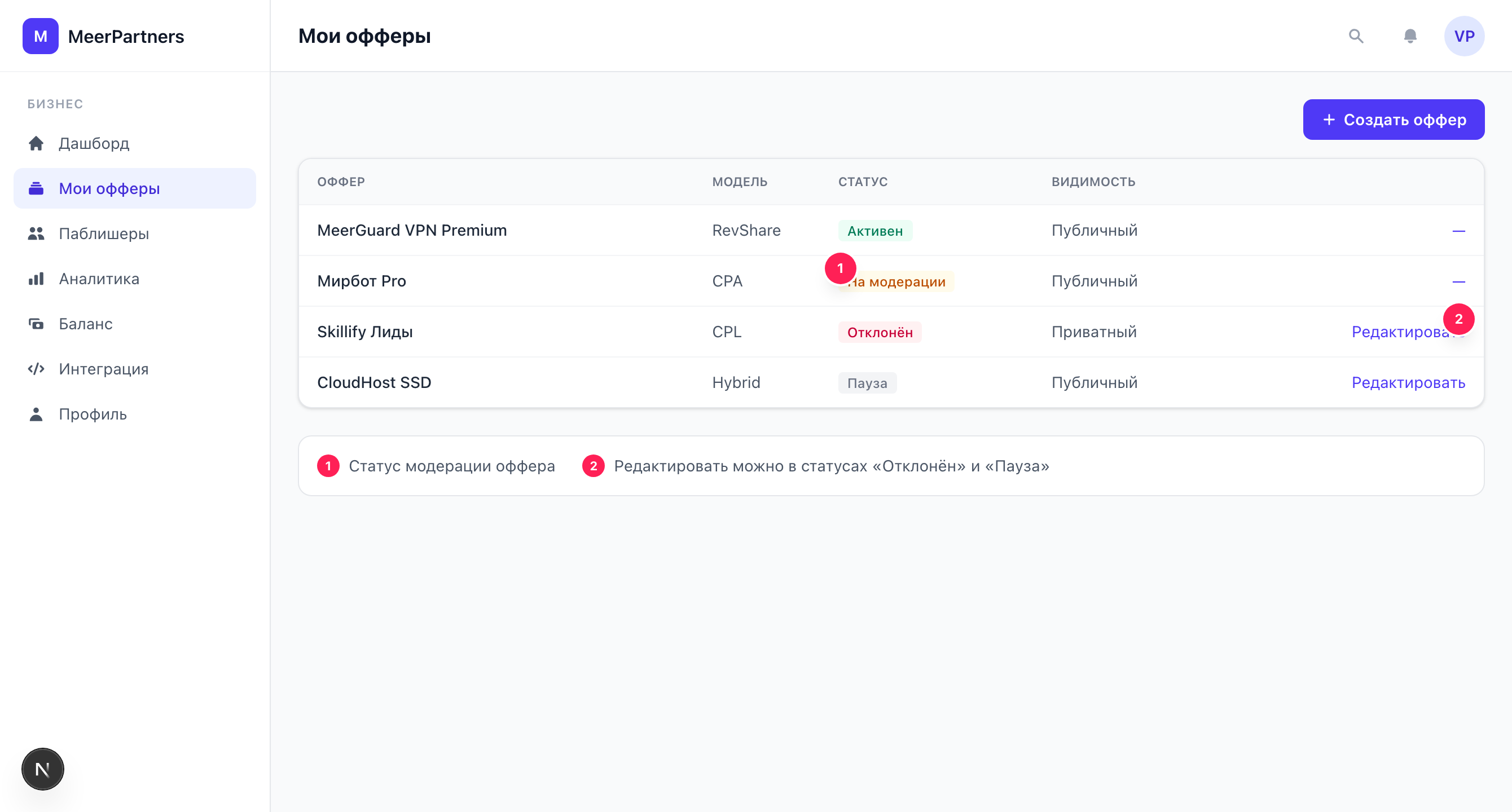
Offer statuses
| Status | What it means | Visible to publishers |
|---|---|---|
| In moderation | The offer is submitted and awaiting platform review. | No |
| Active | The offer is approved and running. | Yes (public) / by access (private) |
| Rejected | Moderation found a problem; a reason is given. | No |
| Paused | The offer is suspended — new links and conversions are unavailable. | No / marked "paused" |
Lifecycle
A freshly created offer always starts with the In moderation status. The platform then moves it to Active or Rejected. You can set an offer to Paused when you need to temporarily stop traffic without deleting the offer.
What the platform checks
Moderation looks at whether the offer complies with the platform's rules and whether it works:
- Landing — the page opens, matches the description, with no deception or malicious content.
- Description and name — clear, not misleading, reflecting the real product.
- Geo — valid ISO country codes you actually work with are specified.
- Model and rates — the chosen monetization model is filled in completely and correctly (for Hybrid — both CPA and RevShare).
- Multi-level accruals — if enabled, the level and rate structure is sensible.
Rejection reason
If an offer is rejected, a banner with the label "Rejection reason:" and text from moderation appears on its card. It is a specific indication of exactly what needs fixing.
Where to see the reason
Open an offer with the Rejected status in the My offers section — the reason is shown right above the edit form. Fix what's indicated and resubmit.
How to fix and resubmit
Editing is available only for offers in the Rejected or Paused status. For an offer with the "In moderation" or "Active" status, the edit form is locked — you will see the hint:
Editing is available only for offers with the "Rejected" or "Paused" status.
Open the rejected offer
In the My offers section, click "Edit" on an offer with the Rejected or Paused status.
Read the reason
The "Rejection reason" banner will tell you exactly what needs fixing.
Make the edits
Change the landing, description, geo, rates — whatever moderation pointed to.
Save the changes
Click "Save changes". The notification "Offer updated" appears, and the offer goes back for review.
Want to change an active offer?
An active offer can't be edited directly — this protects publishers who are already driving traffic to it on agreed terms. To make edits, set the offer to Paused: the edit form will then open. After saving, the offer goes through moderation again.
Common rejection reasons and how to avoid them
Landing unavailable or doesn't match the description
Check that the URL opens without errors and leads exactly to the page you described. Remove redirects to third-party domains.
Incomplete rate for the chosen model
For Hybrid, fill in both the CPA amount and the RevShare percentage. For CPL/CPA/RevShare, the corresponding rate field must be greater than zero.
Invalid geo
Specify countries as ISO codes separated by commas (RU, US, KZ). Conversions from countries outside the list are not counted.
Too many levels without justification
A depth beyond 3 levels requires attention to legal risks. Keep only the levels you need.