Business dashboard
MeerPartners business dashboard: clicks, conversions, spend and available balance for the period, low-balance alert and top offers by spend.
The dashboard (/m) is the landing screen of the business cabinet. A single screen gathers key metrics for the selected period, the state of your escrow balance, and the offers that consume the most money. It is worth checking daily to catch a traffic dip or a draining balance in time.
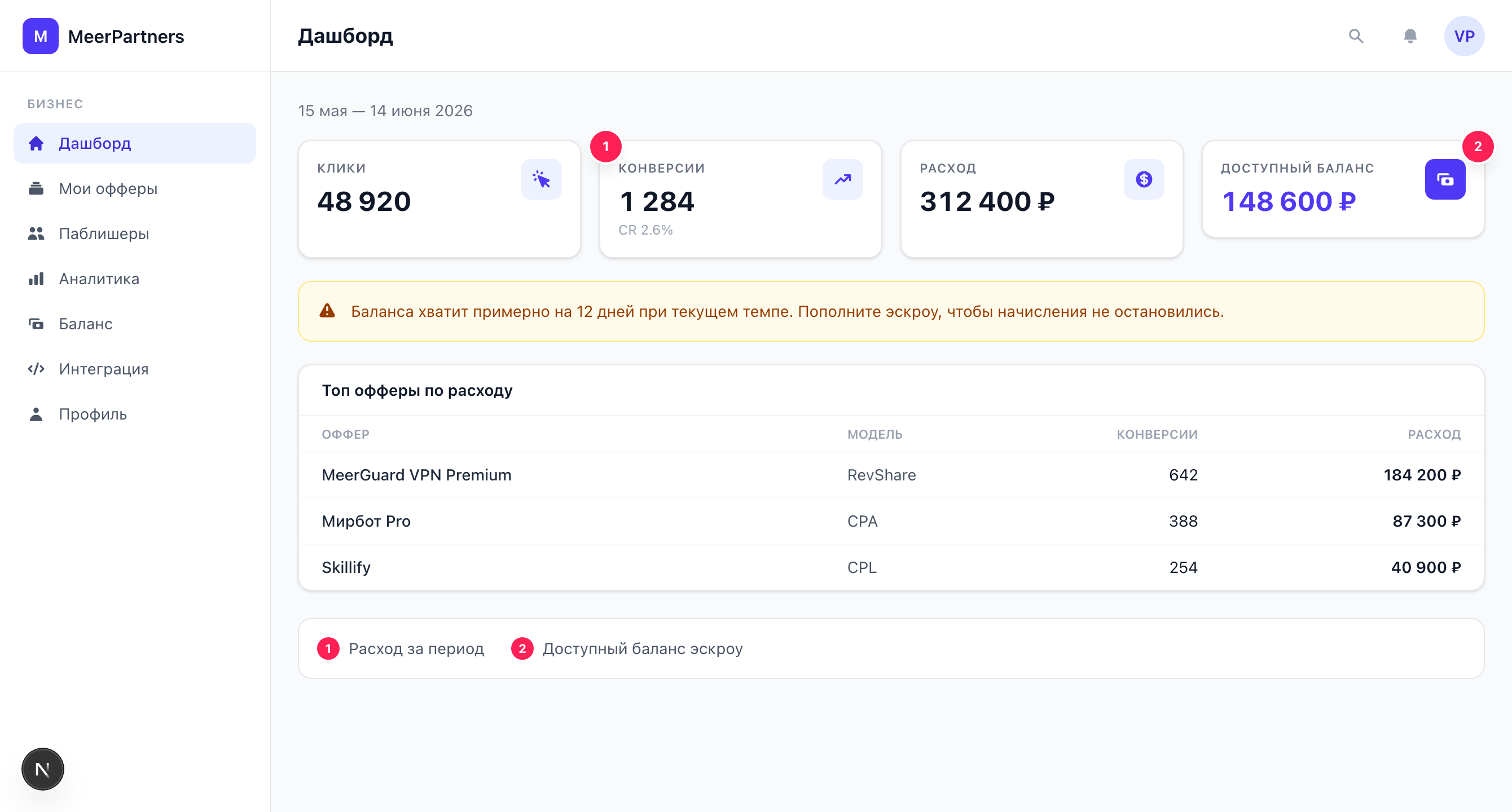
KPI metrics
At the top — four cards for the selected period:
| Metric | What it shows |
|---|---|
| Clicks | How many times tracking links to your offers were clicked. |
| Conversions | How many target actions were counted (arrived via postback). |
| Spend | The sum of rewards to publishers for the period, in your currency. |
| Available balance | How much escrow money is free right now — what new accruals are paid from. |
7 / 30 / 90-day period
In the top right — a period switcher. It opens at 30 days by default. Choosing a period changes all KPIs, the chart and the top-offers list at once. Under the heading, the exact date range the figures are calculated for is shown.
Low-balance alert
If the escrow balance drops to zero (or below the threshold), the platform pauses accruals to influencers — and a red banner appears on the dashboard:
Low balance — accruals to influencers are paused.
Next to it — a "Top up deposit" link leading to the Balance page.
What 'accruals are paused' means
While the balance is at zero, new conversions do not turn into rewards: publishers effectively work without pay, and that quickly kills the motivation to drive traffic to your offer. As soon as you top up the deposit, accruals resume. Don't let the balance hit zero — keep a reserve. More on the mechanics — Balance and escrow.
Top offers by spend
The block shows up to 5 offers sorted by spend for the period — from the most "expensive" to the smallest. It is a quick way to see where the budget goes. The "All offers →" link leads to the My offers section, and the "Top up →" button in the balance block — to the Balance page.
Balance block
To the right of the top offers — a summary of the escrow balance:
- Available — free funds that accruals are paid from.
- Reserved — money held against conversions in hold (frozen but not yet charged).
- Total charged — the sum of all rewards paid out over all time.
If accruals are paused, an "Accruals paused" badge appears under the summary.
Chart
The bar chart "Clicks and conversions by offer" shows how traffic and results are distributed across your offers for the period. If there is no data, "No data for the period" is shown (this happens on a new account or when traffic hasn't started yet).
FAQ
Why is spend above zero but the balance isn't decreasing?
An accrued commission first goes into "Reserved" (hold) and only after confirmation is charged into "Total charged". Until then, "Available" decreases by the reserved amount rather than "vanishing".
KPIs are empty — is that an error?
No. Most likely there have been no clicks and conversions on your offers for the selected period yet, or the offers are still in moderation. Check the offer statuses and widen the period to 90 days.
The figures on the dashboard and in Analytics differ?
Make sure the same period is selected. The dashboard is a condensed summary; for a full per-offer breakdown with CR and EPC, see Analytics.