Creating an offer
How to create an offer in the MeerPartners business cabinet: name, geo, landing, monetization model (CPL, CPA, RevShare, Hybrid), rates, hold and multi-level accruals.
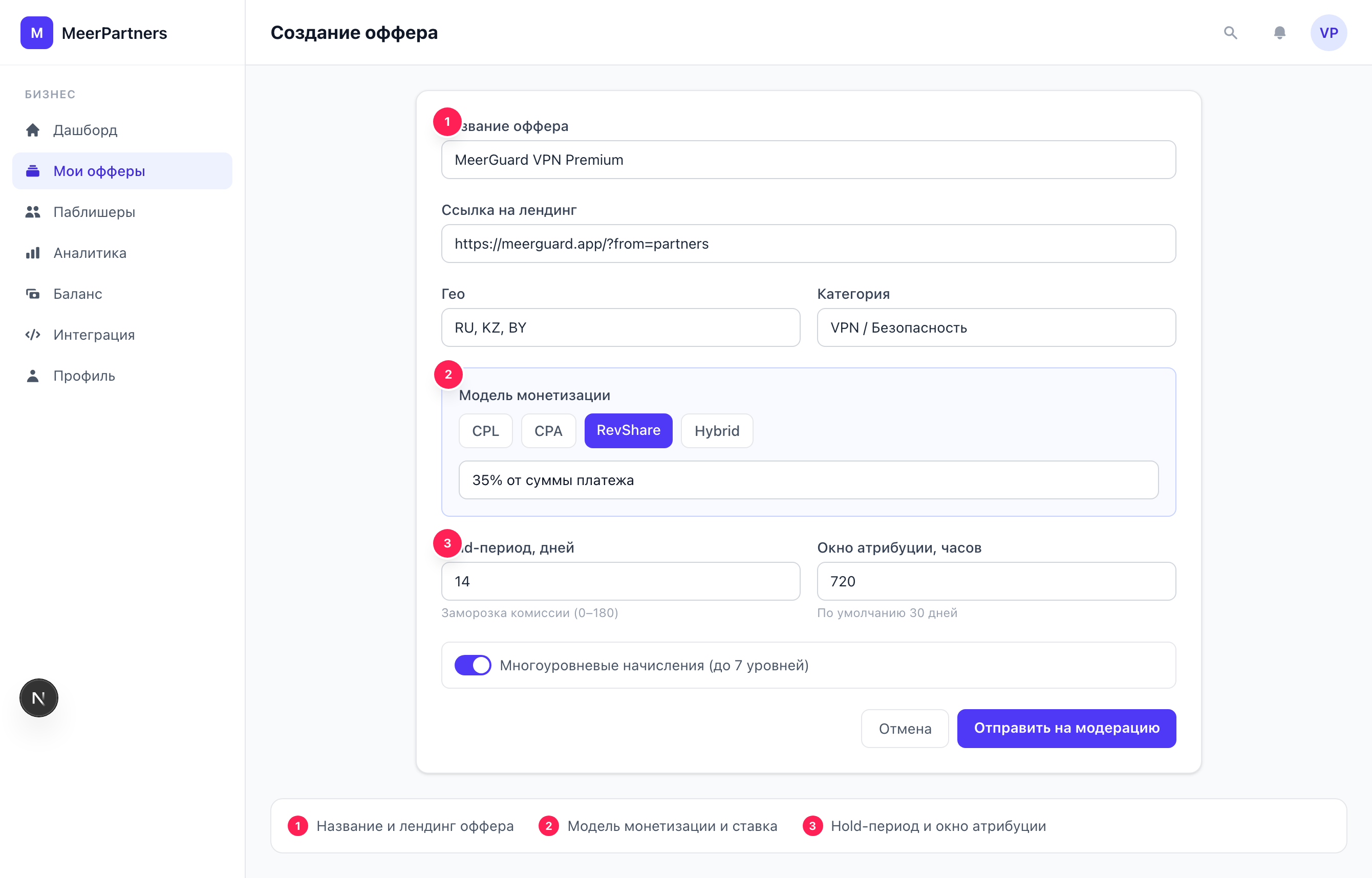
An offer is your affiliate program. Publishers take it on, drive traffic and earn a reward for conversions. Offer creation opens via the "Create offer" button in the My offers section (/m/offers). Only the Owner role (merchant_owner) can create and edit offers.
Before you start — top up your balance
You can create an offer even with no money in the account, but rewards to publishers are paid from the escrow balance. If it is at zero, accruals will be paused. It makes sense to top up the deposit right away: Balance and top-up.
Form fields
Fields marked with an asterisk * are required. Below — a breakdown of each.
Basics
NamestringrequiredA short, recognizable offer name — publishers see it in the catalog. Up to 200 characters. For example: "Service subscription — RU".
DescriptionstringoptionalWhat is being promoted and the key terms. Helps the publisher decide whether to take the offer on. Up to 2000 characters.
Landing URLstringoptionalThe target page the partner's tracking link sends the user to. Up to 2048 characters. The platform appends an aff_click label with the click ID to the address.
Geolist of countriesrequiredThe countries whose traffic is accepted — ISO codes separated by commas: RU, US, KZ. Conversions from other countries are not counted. Specify only the geos you actually work with.
CategorystringoptionalThe offer's vertical (finance, ecom, travel…). Used for filtering in the catalog. Up to 64 characters.
Visibility
A dropdown with two options:
- Public — the offer is visible to all publishers in the offer catalog; any influencer can grab the link.
- Private (by invitation) — the offer is hidden from the general catalog; only influencers you have manually granted access to on the Publishers page can work with it.
When to choose private
Private visibility suits exclusive terms, closed tests and working with hand-picked partners. Public is for mass traffic acquisition. Visibility can be changed later when editing the offer.
Monetization model and rates
The Monetization model field determines how the partner's reward is calculated. Depending on the choice, the form shows the relevant rate fields.
| Model | Paid for | Rate field |
|---|---|---|
| CPL | A lead — sign-up, request | CPL amount * |
| CPA | A target action — sale, deposit | CPA amount * |
| RevShare | A percentage of revenue from each conversion | RevShare % * |
| Hybrid | Fixed + percentage at once | CPA amount * and RevShare % * |
CPL amountnumber (currency)optionalA fixed payout to the partner for each qualified lead. Specified for CPL models.
CPA amountnumber (currency)optionalA fixed payout to the partner for each target action. Specified for CPA and Hybrid.
RevShare %percentageoptionalThe percentage of revenue the partner gets from each conversion. Specified for RevShare and Hybrid.
Hybrid needs both fields
In the hybrid model the partner gets both a fixed amount (CPA) and a percentage (RevShare). If you fill in only one field, the offer won't pass validation — the error "Invalid rate. Check the offer fields." appears. A detailed breakdown of the models — Monetization models.
Hold period
Hold (days)integeroptionalHow many days a conversion is held for confirmation before the reward becomes available to the partner for payout. Protection against fraud and refunds. Default is 14 days, allowed from 0 to 180.
While a conversion is in hold, the accrued commission is reserved on your balance but not yet paid out. If a refund or chargeback arrives during this time, the commission is canceled and the money is returned. In detail: Hold and approval.
Attribution window
The attribution window (attribution_window_hours) is the lifetime of the click cookie: how long after clicking the link a conversion is still credited to the partner. Default is 720 hours (30 days), allowed from 1 hour to 8760 (a year). Attribution works by the last-click model — the last click before the conversion is credited.
Where the window is set
The attribution window and hold are an offer's "rules of the game". The longer the window, the more delayed conversions you will pay for; the longer the hold, the better the protection against refunds, but the longer the partner waits for a payout. Learn more — Attribution and window.
Multi-level accruals
The "Enable multi-level accruals" checkbox turns the offer into a referral network: partners invite other partners and earn a percentage of their conversions.
LevelsintegeroptionalThe depth of the referral network — from 1 to 7. Each level has its own rate. Default is 3.
Rates per levellist of percentagesoptionalHow much is accrued at each level: L1 — direct partners, L2 — those they invited, and so on deeper. The number of rates must match the number of levels.
Deeper than three levels — be careful
When you choose more than 3 levels, the platform shows a warning about the legal risks of multi-level schemes. Make sure the structure complies with the laws of your jurisdiction. The mechanics and limits (including the CAP on total commission and the self-referral ban) are described in Multi-level program.
If the level rates are set incorrectly (wrong list length or negative values), the form returns the error "Level rates are invalid (length or negative values)".
After creation
Clicking "Submit for moderation" creates the offer with the In moderation status — you will see the notification "Offer submitted for moderation".
The offer goes for review
Until it is approved, publishers cannot see it or grab links.
The platform reviews the offer
Moderation looks at the landing, description, geo and rates. The result is the Active or Rejected status.
Active — the offer is in the catalog
After approval, a public offer appears for publishers; a private one becomes available for granting access.
For details on statuses and what to do if rejected — Offer moderation.