Offer catalog
How to find and pick up an offer in the MeerPartners influencer dashboard: filters by model and geo, terms and rates, hold, attribution window, public and private offers.
The offer catalog (/i/offers) is the storefront of all affiliate programs available to you right now. Here you study the terms, compare rates and get a tracking link for the offer you're going to promote.
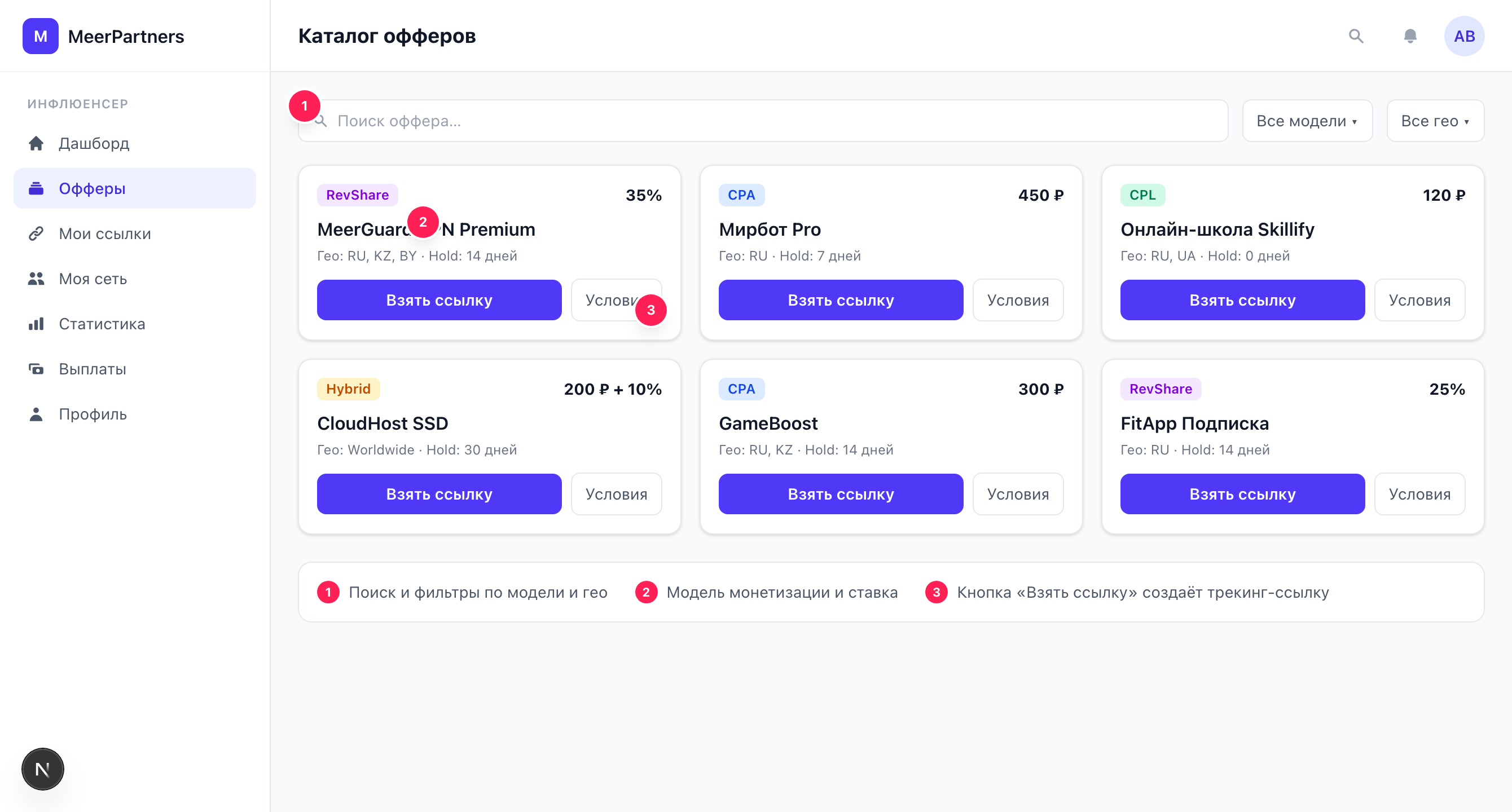
Search and filters
Above the grid of cards are three tools:
- Search by name — the "Search by name..." field; filters the list as you type.
- Model — a dropdown: "All models", CPL, CPA, RevShare, Hybrid.
- Geo — the "Geo (RU, US...)" field; filters offers by country (ISO code, for example
RU).
If nothing matches the current filters, "No offers found" is shown with the hint "Try changing the filters".
What is not shown in the catalog
The catalog displays only offers available to work with. Offers with the "Paused" and "Rejected" status do not appear in the general list. If you saw an offer before but it's gone now — the business most likely paused it.
The offer card in the list
Each card shows the essentials for a quick choice:
- The offer name.
- The monetization model (badge: CPL, CPA, RevShare, Hybrid).
- The rate in a readable form: for example, "500 RUB / lead", "1,200 RUB / sale", "30% / sale" or a combination for Hybrid.
- Geo — country tags (the first few, the rest collapsed into "+N").
- Hold in days.
- A Multi-level badge if multi-level accruals are enabled for the offer.
The "Details" button opens the full offer card.
The full offer card
The offer page gathers all the terms — this is the "Offer terms" block:
| Field | What it means |
|---|---|
| Monetization model | How the reward is calculated: CPL — per lead, CPA — per sale/action, RevShare — a percentage of turnover, Hybrid — fixed + percentage. |
| CPL rate | A fixed payout for a qualified lead (if the model provides for it). |
| CPA rate | A fixed payout for a target action/sale. |
| RevShare % | A percentage of revenue from each conversion. |
| Hold period | How many days a conversion is held until approval before the commission becomes available for withdrawal. |
| Attribution window | The attribution window — within what time after a click a conversion is credited. |
| Geo | The countries whose traffic is accepted. |
| Per-level rates (multi-level) | The grid of percentages by network level (L1, L2, …), if multi-level accruals are enabled. |
More on these concepts: monetization models, attribution and the window, hold and approval, multi-level program.
Only allowed geo is credited
If specific countries are listed in the offer, conversions from other countries are not credited. Before driving traffic, make sure your audience falls within the offer's geo.
A paused offer
A business can temporarily pause an offer. Then the warning "The offer is paused. Creating new links is unavailable" appears in the full card, and the "Get link" button becomes inactive.
What happens to already created links
Your previously created links for this offer are not deleted — but they are marked with an "Offer paused" badge in the Tracking links section and bring no conversions until the offer is back in operation. New links for a paused offer cannot be created (error OFFER_PAUSED).
Public and private offers
- Public — visible to all partners in the catalog, the link can be taken immediately.
- Private — available only to those to whom the business has granted access manually (on its "Publishers" page). Until access is granted, a private offer will not appear in your catalog.
If you need a specific business's private offer — arrange access with them; once granted, the offer will appear in the catalog automatically.
How to get a link
Open the offer
In the catalog, click "Details" on the card you need.
Study the terms
Check the model, rate, hold, attribution window and geo — whether the offer suits your traffic.
Click 'Get link'
The platform creates a personal tracking link and shows it in a window: the "Link code" and "Full URL" in the form https://<domain>/r/{code}.
Copy and use
Click "Copy" — the link is in the clipboard. Place it in your channel, ad or description.
Link limit per offer
A limited number of links can be created per offer. If you try to exceed the limit, the error "Link limit reached for this offer" (LINK_LIMIT_REACHED) appears. Usually the limit is more than enough: it's more convenient to separate different traffic sources not with new links, but with sub_id tags within a single one — see Tracking links and sub-id.