My network (referrals)
The MeerPartners multi-level referral program: invite sub-influencers and earn a percentage of their conversions up to 7 levels. Referral code, levels L0–L7, CAP.
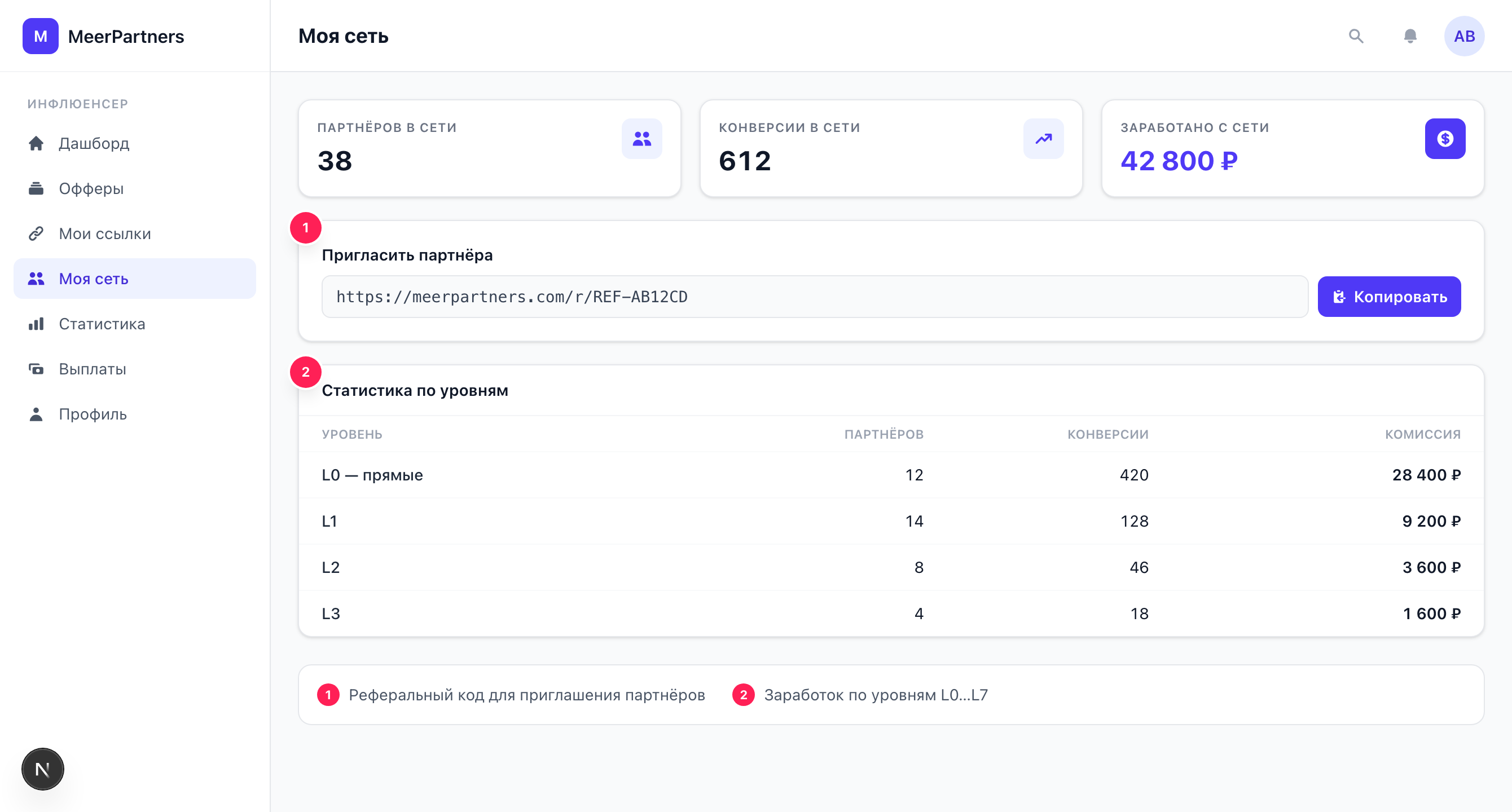
The "My network" section (/i/network) is a multi-level program: you invite other influencers and earn a percentage of their conversions. Those you invite can invite their own — and so on, up to 7 levels deep. The more active your network, the more passive income you get on top of your personal earnings.
How it works
When an influencer registers via your referral link, they become your first-level partner. From there:
- you receive a level L1 commission on their conversions;
- a level L2 commission on the conversions of those they invited;
- and so on, up to L7.
The per-level percentages are set by the business in the settings of a specific offer (the "Per-level rates" grid). So your earnings from the network depend on which offers your partners drive traffic to.
L0 is you yourself
In the statistics, the L0 (direct) level is your own conversions (personal traffic). The network starts at L1 — that's already earnings from invited partners.
Referral link and code
In the "Invite a partner" block your personal referral link is shown, in the form:
https://<portal domain>/auth/login?ref={referral_code}Click "Copy" and send the link to whoever you want to invite. The invitee signs in with MeerID, clicks "Become a partner" and joins your network right away (the link is set once: the inviter can't be changed later). If the code in the link is wrong, the portal shows "Referral code not found" (REF_CODE_NOT_FOUND) and offers to continue without the invite.
Don't confuse it with /r/{code} tracking links for offers: those count buyer clicks and conversions, while the referral link invites partners into your network. The referral code itself is also available in your profile in the "Referral code" block.
If the link is unavailable
If "Referral code unavailable" is shown instead of the link — a code hasn't been assigned to your account yet. Check your profile; if there's no code there either, contact support.
How to invite a partner
Copy the referral link
In the "Invite a partner" block, click "Copy".
Send the invitation
Share the link with the influencer you're inviting into your network.
The partner registers via the link
By clicking it and registering, they get attached to your network as an L1 partner.
Track your network income
Partners' conversions will appear in the summary and in the tree by level.
Summary and per-level statistics
Below the invitation block are two cards:
- Earned from the network — the total commission from level L1 and deeper (your personal earnings are not included here).
- Conversions in the network — the number of conversions brought by network partners.
Below is the "Per-level statistics" block: a tree where each row is a level (L0 — direct, L1, L2, …) with the number of conversions and the commission amount. Data is shown for the last 30 days. If there's no data, "No per-level data for the last 30 days" is displayed with a hint to invite your first partner.
The network is not active yet
If there's only an L0 row and no L1+ levels yet — a message is shown that the multi-level program is not active yet. Invite your first partner via the referral link to launch the network.
CAP — a limit on total commission
A CAP applies to the total network commission — an upper limit on the share that can be accrued across all levels together. This protects the offer's economics from infinite "multiplication" of accruals deep into the tree. The specific values depend on the offer's settings; more details — Multi-level program.
Ban on inviting yourself
You can't become your own referral. An attempt to register via your own link or otherwise close the network on yourself results in the error "You can't invite yourself" (SELF_REFERRAL_FORBIDDEN).
If the network is unavailable
For individual offers, multi-level accruals may be disabled. In that case, network operations may produce the error "Multi-level program unavailable" (MULTILEVEL_DISABLED) — this means that network income is not provided for under this offer.
Frequently asked questions
How many levels are credited?
Up to 7 (L1…L7). The depth and per-level percentages are set by the business in the offer settings.
Where does the per-level percentage come from?
From the "Per-level rates" grid of a specific offer. It differs across offers, and for some offers multi-level may be disabled.
Is network income withdrawn the same way as personal income?
Yes. Network commission goes into the common balance and passes the same hold and withdrawal rules — see Payouts and balance.