Payouts and balance
How to withdraw earnings in MeerPartners: available/on-hold balance, withdrawal methods (card, USDT crypto, Telegram Stars, bank), minimum amounts, KYC, request statuses.
The "Payouts" section (/i/payouts) — here you see your balance, add withdrawal methods and request a payout of your earned commission. This is the final step of the money cycle: once conversions have passed hold, the money becomes available for withdrawal.
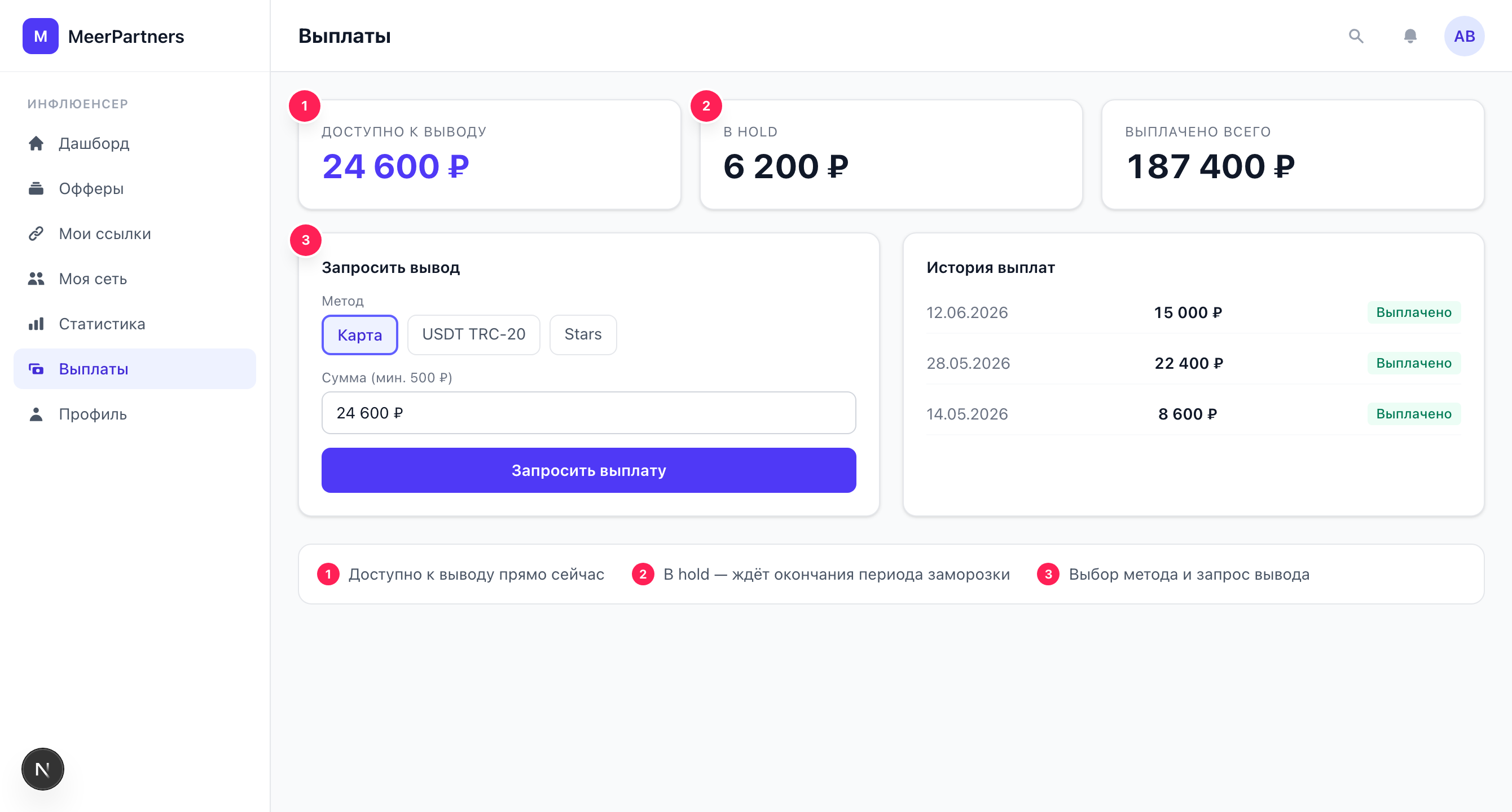
Balance: available for withdrawal and on hold
The "Balance" block shows, per currency:
- Available for withdrawal — money that has passed hold and can be withdrawn right now.
- On hold — accrued commission that is still "maturing": conversions are credited, but the freeze period hasn't ended. This amount will become available automatically as hold passes.
- In payout — commissions reserved for your withdrawal request while it is being processed.
- Refund debt — purchase refunds on commissions that were already paid out. Nothing is charged to your card: the debt is repaid automatically from future earnings. While the debt exceeds the available balance, withdrawal is unavailable (
PAYOUT_BLOCKED_BY_DEBT).
Why some money is 'on hold'
Hold is the business's protection against chargebacks and fraud: the reward is frozen for the period set in the offer, and only then becomes available for withdrawal. That's why fresh conversions first go into "On hold" rather than "Available". More details — Hold and approval.
Your payout currency is shown first (see profile). If there are accruals in several currencies, a withdrawal is requested separately for each currency — pick the currency in the request dialog.
Withdrawal methods
Before withdrawing, add at least one method. The following are supported:
| Method | Details | Note |
|---|---|---|
| Card | Card number | Withdrawal in rubles. |
| Crypto (USDT TRC-20) | Wallet address | TRON network (TRC-20). |
| Telegram Stars | Telegram ID | — |
| Bank transfer | Account (IBAN / acct. no.), bank name, BIC | — |
Details are stored encrypted
The details you enter are encrypted before saving and are not shown back in plain text — in the list of methods you only see a masked "tail" (the last digits). This is normal and done for your security.
How to add a method
Open '+ Add method'
In the "Withdrawal methods" block, click "+ Add method".
Choose a type
Card / Crypto (USDT TRC-20) / Telegram Stars / Bank transfer.
Fill in the details
The fields depend on the type (card number, wallet address, Telegram ID or bank details).
Make it primary if needed
Check "Make primary withdrawal method" so it's used by default.
Save
The method will appear in the list with a "Default" badge if you marked it that way.
A method can be deleted with the "Delete" button next to it.
KYC and withdrawals
The "Request withdrawal" button is active as soon as at least one withdrawal method is added. Whether verification is required is decided by the platform: if KYC is mandatory, the request fails with "Complete KYC to withdraw" (KYC_REQUIRED).
You can complete verification in your profile; details — on the Verification (KYC) page.
Minimum withdrawal amounts
A withdrawal has a minimum threshold by currency:
| Currency | Minimum |
|---|---|
| RUB | 500 |
| USD | 10 |
| EUR | 10 |
If you request less than the minimum, the error "Amount below the minimum" (BELOW_MIN_PAYOUT) appears.
How to request a withdrawal
Click 'Request withdrawal'
The button is active once a withdrawal method is added.
Specify the amount
You can enter an amount or leave the field empty — then the entire available balance is withdrawn.
Choose a method
From the list of added methods.
Confirm
Click "Request". A "Withdrawal request submitted" notification appears.
One active request at a time
While a request is being processed, you can't submit a second one — there will be the error "An unprocessed request already exists" (PAYOUT_PENDING_EXISTS). Wait for the current payout to complete.
Withdrawal request statuses
A request goes through the path:
requested ──> processing ──> paid
                   │
└──> failed / rejected- requested — the request is created, awaiting processing.
- processing — the payout is being processed by the provider.
- paid — the money is sent, the payout is complete.
- failed / rejected — the payout failed or was rejected; the funds are returned to the available balance, and the request can be submitted again.
Processing is asynchronous: after the request is submitted, the system itself runs the payment through the provider, so the status doesn't change instantly. All requests (the last 100) with statuses and dates are listed in the "Payout history" block on the same page.
Common errors
| What you see | Cause and solution |
|---|---|
"Amount below the minimum" (BELOW_MIN_PAYOUT) | Less than the minimum for the currency was requested (RUB 500 / USD 10 / EUR 10). Increase the amount. |
"Insufficient funds" (INSUFFICIENT_BALANCE) | The amount is more than the available balance. Note that money "on hold" can't be withdrawn. |
"Complete KYC to withdraw" (KYC_REQUIRED) | Verification not completed. Complete KYC. |
"An unprocessed request already exists" (PAYOUT_PENDING_EXISTS) | There's an active request. Wait for it to complete. |
"Add a withdrawal method" (NO_PAYOUT_METHOD) | No method has been added. Add a method and try again. |